Augmentation Operators Reference
An augmentation operator perturbs spectra. The sample-augmentation node creates origin-linked training copies; the feature-augmentation node creates representations. Choose the physical change you expect at deployment before selecting noise, drift, wavelength warp or masking. Check that the target remains valid.
Choose a perturbation that resembles real acquisition variability
Read sample_augmentation: give training examples plausible variants for the worked result figure, expected dimensions and exercises. Choose a family below to compare the enumerated operators.
Same worked recipe in JSON, YAML and Python
{
  "pipeline": [
    {
      "split": {
        "class": "sklearn.model_selection.KFold",
        "params": {
          "n_splits": 3
        }
      }
    },
    {
      "sample_augmentation": {
        "transformers": [
          {
            "class": "nirs4all.operators.augmentation.GaussianAdditiveNoise",
            "params": {
              "sigma": 0.01
            }
          }
        ],
        "count": 2,
        "selection": "random",
        "random_state": 42
      }
    },
    {
      "model": {
        "class": "sklearn.cross_decomposition.PLSRegression",
        "params": {
          "n_components": 2
        }
      }
    }
  ]
}
pipeline:
- split:
    class: sklearn.model_selection.KFold
    params:
      n_splits: 3
- sample_augmentation:
    transformers:
    - class: nirs4all.operators.augmentation.GaussianAdditiveNoise
      params:
        sigma: 0.01
    count: 2
    selection: random
    random_state: 42
- model:
    class: sklearn.cross_decomposition.PLSRegression
    params:
      n_components: 2
from sklearn.model_selection import KFold
from sklearn.cross_decomposition import PLSRegression
from nirs4all.operators.augmentation import GaussianAdditiveNoise

pipeline = [
    KFold(n_splits=3),
    {"sample_augmentation": {
        "transformers": [GaussianAdditiveNoise(sigma=0.01)],
        "count": 2, "selection": "random", "random_state": 42,
    }},
    {"model": PLSRegression(n_components=2)},
]
These are Python SDK operators. Native R/Octave/WASM recipes use their own method IDs and facade; see 10. Run the same recipe in your language.
Noise
Class |
Key Parameters |
Description |
|---|---|---|
|
|
Adds per-sample Gaussian noise scaled by sample std |
|
|
Multiplies spectra by random gain factor: X * (1 + epsilon) |
|
|
Adds spike artifacts to random spectral positions |
|
|
Signal-dependent detector noise (noise scales with signal magnitude) |
Baseline Drift
Class |
Key Parameters |
Description |
|---|---|---|
|
|
Adds a linear baseline drift: X + a + b * lambda |
|
|
Adds a polynomial baseline drift of given degree |
Wavelength Distortion
Class |
Key Parameters |
Description |
|---|---|---|
|
|
Shifts the wavelength axis by a random amount (simulates calibration drift) |
|
|
Stretches or compresses the wavelength axis around its center |
|
|
Non-linear warp of the wavelength axis using spline control points |
Spectral Distortion
Class |
Key Parameters |
Description |
|---|---|---|
|
|
Multiplies the spectrum by a smooth spline-based gain curve |
|
|
Perturbs random wavelength bands with gain and offset |
|
|
Applies Gaussian smoothing with random sigma per sample |
|
|
Spectral sharpening via unsharp masking: X + k * (X - smooth(X)) |
|
|
Masks random spectral bands; mode: |
|
|
Randomly zeroes out individual spectral channels |
|
|
Clips local regions of the spectrum |
Mixup
Class |
Key Parameters |
Description |
|---|---|---|
|
|
Blends samples with KNN neighbors (global mixup) |
|
|
Band-local mixup with KNN neighbors |
|
|
Simple MSC-style scatter simulation between samples |
Physical / Instrumental
Class |
Key Parameters |
Description |
|---|---|---|
|
|
Simulates optical path length variation via multiplicative scaling |
|
|
Simulates batch/session effects with wavelength-dependent offset and gain |
|
|
Simulates spectral resolution broadening via Gaussian convolution |
|
|
Simulates dead spectral bands from detector saturation or failure |
Environmental
These operators require wavelength information and inherit from SpectraTransformerMixin.
Class |
Key Parameters |
Description |
|---|---|---|
|
|
Simulates temperature-induced spectral changes (peak shifts, intensity, broadening) |
|
|
Simulates moisture/water activity effects on NIR spectra |
Scattering
These operators require wavelength information.
Class |
Key Parameters |
Description |
|---|---|---|
|
|
Simulates particle size effects on scattering (wavelength-dependent baseline) |
|
|
Applies EMSC-style polynomial scattering distortions |
Edge Artifacts
These operators require wavelength information and simulate detector boundary effects.
Class |
Key Parameters |
Description |
|---|---|---|
|
|
Simulates detector sensitivity roll-off at spectral edges |
|
|
Simulates stray light effects (peak truncation at edges) |
|
|
Simulates edge curvature/baseline bending from optical aberrations |
|
|
Adds truncated peaks at spectral boundaries |
|
|
Combined edge artifacts augmenter (applies multiple edge effects) |
Available detector models for DetectorRollOffAugmenter:
"ingaas_standard"– Standard InGaAs (1000-1600 nm optimal)"ingaas_extended"– Extended InGaAs (1100-2200 nm optimal)"pbs"– PbS detector (1000-2800 nm optimal)"silicon_ccd"– Silicon CCD (400-900 nm optimal)"generic_nir"– Generic NIR detector (900-1700 nm optimal)
Spline-Based
Class |
Key Parameters |
Description |
|---|---|---|
|
|
Applies a smoothing spline to each spectrum |
|
|
Perturbs the wavelength (x) axis via B-spline control points |
|
|
Perturbs the intensity (y) axis via B-spline control points |
|
|
Simplifies the spectrum along the x-axis using spline resampling |
|
|
Simplifies the spectrum along the curve length using spline resampling |
Random Geometric
Class |
Key Parameters |
Description |
|---|---|---|
|
|
Rotation and translation augmentation: adds piecewise linear distortion |
|
|
Random multiplicative/additive operations on spectra |
See Also
Transforms Reference – Preprocessing transforms reference
Pipeline Keywords Reference – Pipeline keyword syntax (including
sample_augmentationandfeature_augmentation)
What the perturbations mean
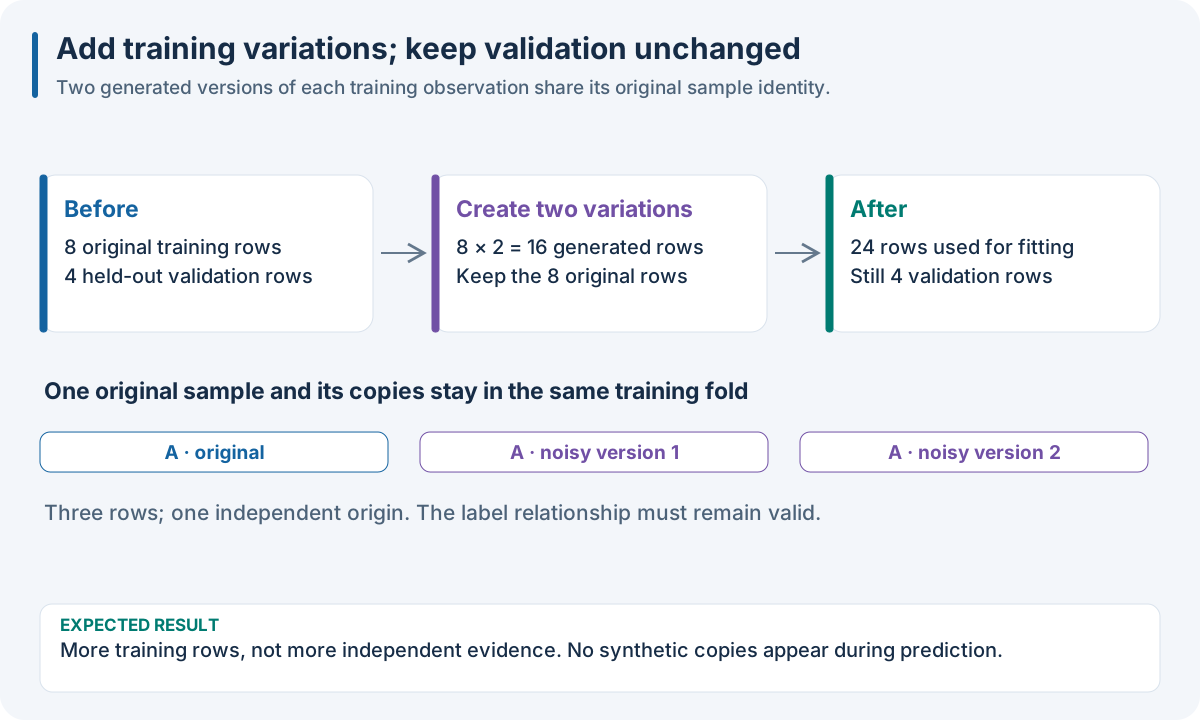
Illustrative acquisition changes. Copies share the original sample’s identity and target assumptions; they do not add independent validation evidence.
Mechanism |
Operators |
Interpretation and important limit |
|---|---|---|
Detector noise |
GaussianAdditiveNoise, HeteroscedasticNoiseAugmenter |
Constant-relative versus signal-dependent uncertainty; too much noise erases weak peaks |
Gain/scatter |
MultiplicativeNoise, PathLengthAugmenter, ScatterSimulationMSC |
Alters intensity without moving peaks; may conflict with a concentration target if used beyond plausible acquisition variability |
Baseline |
LinearBaselineDrift, PolynomialBaselineDrift, BatchEffectAugmenter |
Adds nuisance offset/slope/curvature; batch-wide perturbations differ from independent sample noise |
Calibration drift |
WavelengthShift, WavelengthStretch, LocalWavelengthWarp |
Moves spectral features; shift/scale/warp have different geometry and boundary behavior |
Local amplitude |
SmoothMagnitudeWarp, BandPerturbation |
Alters broad envelopes or particular bands; can change the chemical meaning of a band |
Resolution |
GaussianSmoothingJitter, InstrumentalBroadeningAugmenter, UnsharpSpectralMask |
Blur or sharpen local detail; broadening is a more direct resolution model than arbitrary sharpening |
Missing/saturated channels |
BandMasking, ChannelDropout, DeadBandAugmenter, LocalClipping, SpikeNoise |
Simulates failures rather than an alternative physical sample; zero masking and interpolation produce different signatures |
Inter-sample mixing |
MixupAugmenter, LocalMixupAugmenter |
Requires a meaningful mixed-target assumption; nearest-neighbor structure and source origins matter |
Spline perturbations |
Spline_Smoothing, Spline_X_Perturbations, Spline_Y_Perturbations, Spline_X_Simplification, Spline_Curve_Simplification |
Changes curve smoothness, axis, amplitude or representation; distinguish displacement from simplification |
Environmental changes |
TemperatureAugmenter, MoistureAugmenter |
Models effects associated with temperature/water; those effects may also affect the true target |
Particle scattering |
ParticleSizeAugmenter, EMSCDistortionAugmenter |
Empirical wavelength-dependent scattering; not a complete physical scattering simulation |
Detector edges |
DetectorRollOffAugmenter, StrayLightAugmenter, EdgeCurvatureAugmenter, TruncatedPeakAugmenter, EdgeArtifactsAugmenter |
Models edge sensitivity, flattening, curvature or truncated peaks; detector range and wavelength units are essential |
General geometry |
Rotate_Translate, Random_X_Operation |
Broad numerical transformations; justify their relation to actual instrument variability |
These mechanisms are hypotheses about deployment variability. Use an unchanged baseline and the same independent-unit folds to test each hypothesis. A visibly plausible curve does not establish target-label validity or improved accuracy.
Sample versus feature augmentation
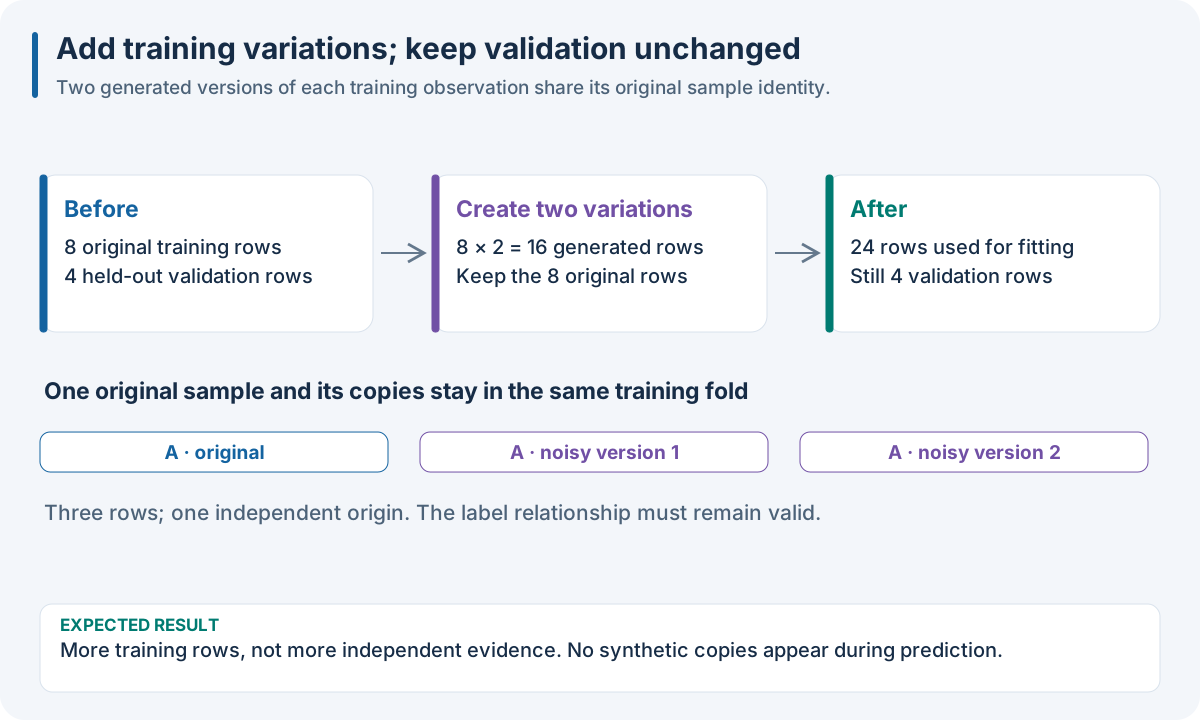
Educational workflow result; read the accompanying explanation for scope and interpretation.
Sample augmentation increases training observations; feature augmentation adds representations of each observation. Prediction must replay the feature construction needed by the fitted model, while training-only sample generation is skipped. The container, rather than the augmentation class name alone, determines workflow semantics. See sample_augmentation: give training examples plausible variants and feature_augmentation: retain several views of the same observations for layout, counts and replay rules.
Augmented rows must remain with their original in every train/validation split. If an operator combines several origins, its relation must be accounted for; arbitrary random splitting after augmentation creates leakage. The reported sample count should distinguish independent samples from generated rows.
Diagnose an augmentation experiment
Inspect before/after overlays, peak positions, signal ranges and target
distribution. Check that held-out rows are unchanged and original-to-copy
relations are recorded. Compare per-origin errors, not only errors averaged
over generated rows. If augmentation helps one instrument but harms another,
report the subgroup effect and revisit the assumed perturbation distribution.
For parameter and method details use nirs4all.operators.augmentation under
API Reference.