Filters Reference
A filter answers a concrete question about an observation: unusual target, unfamiliar spectrum, failed acquisition, influential position or ineligible metadata. A flag is evidence to inspect. Tagging keeps the row; exclusion omits flagged training rows from fitting. Neither proves the observation is wrong.
Choose a criterion, then decide what its flag means
Read tag: flag a sample and keep it for the worked result figure, expected dimensions and exercises. Choose a family below to compare the enumerated operators.
Same worked recipe in JSON, YAML and Python
{
  "pipeline": [
    {
      "tag": {
        "class": "nirs4all.operators.filters.YOutlierFilter",
        "params": {
          "method": "iqr",
          "threshold": 1.5,
          "tag_name": "extreme_target"
        }
      }
    }
  ]
}
pipeline:
- tag:
    class: nirs4all.operators.filters.YOutlierFilter
    params:
      method: iqr
      threshold: 1.5
      tag_name: extreme_target
from nirs4all.operators.filters import YOutlierFilter

pipeline = [{"tag": YOutlierFilter(
    method="iqr", threshold=1.5, tag_name="extreme_target",
)}]
These are Python SDK operators. Native R/Octave/WASM recipes use their own method IDs and facade; see 10. Run the same recipe in your language.
YOutlierFilter
Detects samples with outlier target (y) values.
Parameter |
Default |
Description |
|---|---|---|
|
|
Detection method: |
|
|
Method-specific threshold (see below) |
|
|
Lower cutoff for percentile method |
|
|
Upper cutoff for percentile method |
|
|
Custom reason string for reports |
|
|
Custom tag name (defaults to auto-generated) |
Method Details
Method |
Threshold Meaning |
Typical Values |
|---|---|---|
|
Multiplier of the interquartile range |
1.5 (mild), 3.0 (extreme) |
|
Number of standard deviations from mean |
2.0-3.0 |
|
Uses |
1-99, 5-95 |
|
Multiplier of Median Absolute Deviation |
3.0-3.5 |
XOutlierFilter
Detects samples with outlier spectral features (X values).
Parameter |
Default |
Description |
|---|---|---|
|
|
Detection method (see below) |
|
|
Detection threshold (auto-computed if None for some methods) |
|
|
Number of PCA components (for PCA-based methods) |
|
|
Expected outlier proportion (for sklearn methods) |
|
|
Random seed for reproducibility |
|
|
Support fraction for robust covariance estimation |
|
|
Custom reason string for reports |
|
|
Custom tag name |
Method Details
Method |
Description |
Key Parameters |
|---|---|---|
|
Mahalanobis distance from center |
|
|
Robust Mahalanobis using MinCovDet |
|
|
Q-statistic (squared reconstruction error) |
|
|
Hotelling’s T-squared in PCA score space |
|
|
Isolation Forest anomaly detection |
|
|
Local Outlier Factor |
|
SpectralQualityFilter
Detects samples with poor spectral quality.
Parameter |
Default |
Description |
|---|---|---|
|
|
Maximum allowed NaN ratio per spectrum (0-1) |
|
|
Maximum allowed zero-value ratio |
|
|
Minimum variance threshold (flags flat spectra) |
|
|
Maximum allowed value (saturation detection) |
|
|
Minimum allowed value |
|
|
Whether to check for infinite values |
|
|
Custom reason string |
|
|
Custom tag name |
HighLeverageFilter
Detects high-leverage samples that may unduly influence model fitting.
Parameter |
Default |
Description |
|---|---|---|
|
|
Leverage computation: |
|
|
Multiple of average leverage used as threshold |
|
|
Absolute threshold (overrides multiplier if set) |
|
|
Number of PCA components (for |
Common threshold guidelines:
threshold_multiplier=2.0– 2x average leverage (standard rule)threshold_multiplier=3.0– 3x average leverage (conservative)absolute_threshold=0.5– Fixed absolute threshold
MetadataFilter
Filters samples based on metadata column values.
Parameter |
Default |
Description |
|---|---|---|
|
(required) |
Metadata column name to filter on |
|
|
Callable returning True for samples to KEEP |
|
|
List of values that should be excluded |
|
|
List of values that should be kept |
Usage examples (the callable condition is Python-only; value-list filters serialize in SDK recipes):
from nirs4all.operators.filters import MetadataFilter

# Exclude specific values
MetadataFilter(column="quality_flag", values_to_exclude=["bad", "corrupted"])

# Keep only specific values
MetadataFilter(column="sample_type", values_to_keep=["control", "treatment"])

# Custom condition
MetadataFilter(column="temperature", condition=lambda x: 20 <= x <= 30)
CompositeFilter
Combines multiple filters with AND/OR logic.
Parameter |
Default |
Description |
|---|---|---|
|
(required) |
List of |
|
|
Combination logic: |
{
  "class": "nirs4all.operators.filters.base.CompositeFilter",
  "params": {
    "filters": [
      "nirs4all.operators.filters.y_outlier.YOutlierFilter",
      "nirs4all.operators.filters.x_outlier.XOutlierFilter"
    ]
  }
}
class: nirs4all.operators.filters.base.CompositeFilter
params:
  filters:
  - nirs4all.operators.filters.y_outlier.YOutlierFilter
  - nirs4all.operators.filters.x_outlier.XOutlierFilter
from nirs4all.operators.filters import CompositeFilter, YOutlierFilter, XOutlierFilter

composite = CompositeFilter(
    filters=[
        YOutlierFilter(method="iqr"),
        XOutlierFilter(method="mahalanobis"),
    ],
    mode="any",  # Exclude if ANY filter flags the sample
)
Tag vs Exclude Keywords
Keyword |
Behavior |
|---|---|
|
Marks samples with a tag for downstream analysis or branching. Samples are NOT removed from training. |
|
Removes flagged samples from training data. Test samples are never excluded. |
|
Multiple filters combined: |
See Also
Pipeline Keywords Reference – Full pipeline keyword reference (including
tagandexclude)Splitters Reference – Cross-validation splitters
Transforms Reference – Preprocessing transforms
Read a flag as evidence, not a diagnosis
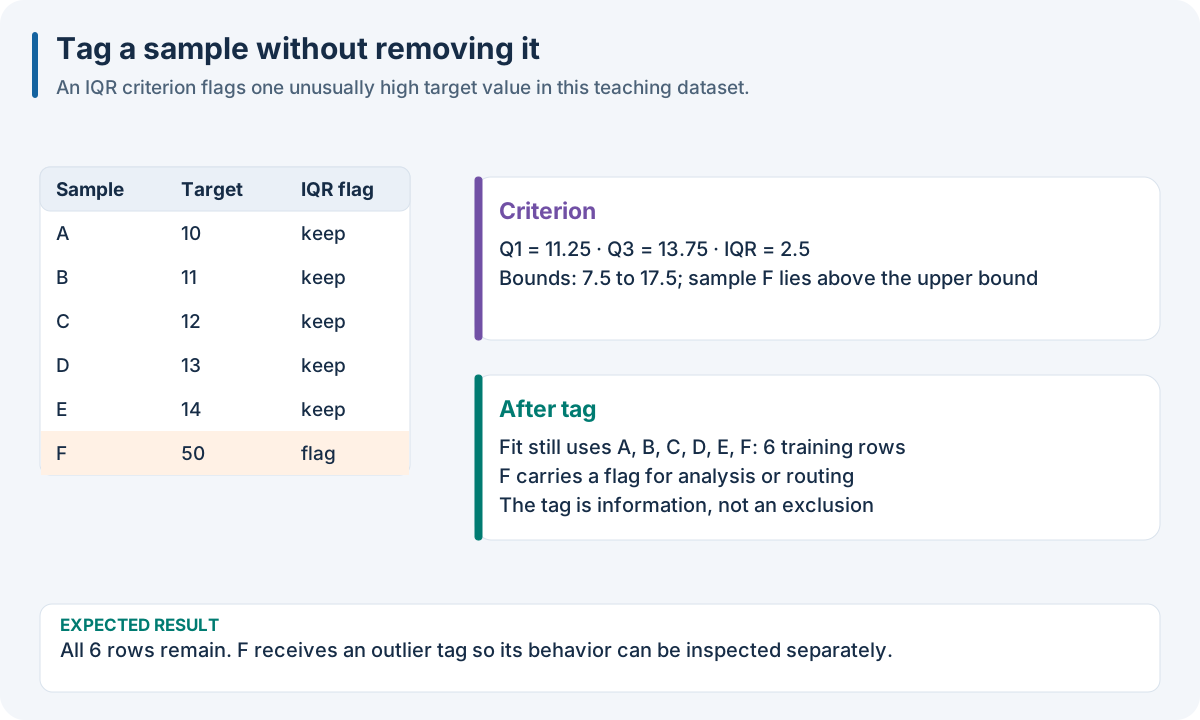
Educational workflow result; read the accompanying explanation for scope and interpretation.
A criterion yields a flag and reason. Tagging preserves the observation; exclusion changes the fitting population. Neither establishes that a measurement is wrong. Retain flags, independent sample IDs and the original population when reporting outcomes. Do not improve a reported test score by discarding difficult test samples after observing their targets.
YOutlierFilter tests target extremeness using IQR, z-score, percentile or MAD.
An extreme concentration may be valid and important for extrapolation. It
also requires labels, so it cannot screen unlabeled future acquisitions.
XOutlierFilter tests a different question: distance, reconstruction error,
leverage or local density in feature space. The result depends strongly on
preprocessing, dimensionality and the reference training population.
SpectralQualityFilter detects numerical acquisition problems such as NaN,
infinity, flat spectra, saturation or excessive zeros. Its cutoffs must match
the input signal units. HighLeverageFilter detects influential feature
positions; influence is not the same as a large prediction residual.
MetadataFilter applies explicit domain rules and needs the named metadata
column and a clear keep/exclude convention. CompositeFilter expresses
union (any) or intersection (all) of criteria.
For two flag sets A and B, any removes A ∪ B and all removes A ∩ B.
For example, if A flags rows 1 and 2 and B flags 2 and 3, any flags three
rows while all flags only row 2. Keep individual reasons so this difference
can be inspected after running the recipe.
Where filtering belongs in a workflow
Estimate statistical cutoffs on training rows under the engine’s supported filter profile. Decide the policy before model selection and use the same policy for candidate comparisons. Tag first when investigating an unfamiliar dataset; inspect subgroup counts and errors before choosing exclusion. Check how exclusion interacts with groups, scarce target ranges and folds: removing a few rows can leave an entire fold with too few independent samples.
Use U03_sample_filtering.py, U05_tagging_analysis.py and
U06_exclusion_strategies.py for full examples. The exact node contracts are
tag: flag a sample and keep it and exclude: choose which training rows influence the fit; class-level fit/mask methods are in
nirs4all.operators.filters under API Reference. The serialized Python
class form and the native capability profile must be checked separately.