exclude: choose which training rows influence the fit
Use exclusion for a justified acquisition or eligibility rule: corrupted scans, impossible instrument readings, or a declared population restriction. Start with tag: flag a sample and keep it when you are still investigating.
For [10, 11, 12, 13, 14, 50], the IQR rule below flags target 50 (bounds 7.5–17.5). Five rows can fit the model. Original arrays and identities remain stored so the sixth row can be reported. Prediction does not use this node to discard new submitted rows.
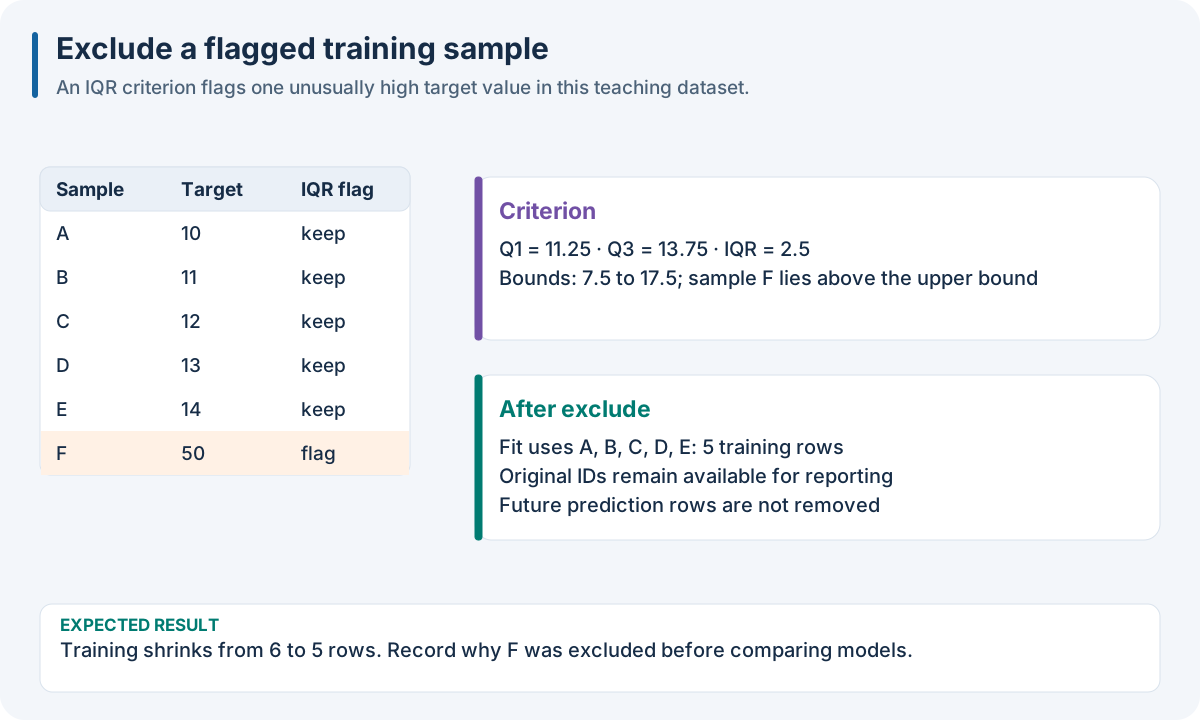
Educational exclusion example. Exclusion changes the fitting population; future prediction still returns a result per submitted sample.
Worked recipe
Download dataset.json from 1. Run your first complete experiment. The JSON/YAML tabs define SDK pipeline files; the Python tab defines pipeline. The execution box below loads the same observations and runs the recipe.
{
  "pipeline": [
    {
      "exclude": {
        "class": "nirs4all.operators.filters.YOutlierFilter",
        "params": {
          "method": "iqr",
          "threshold": 1.5,
          "tag_name": "extreme_target"
        }
      }
    },
    {
      "model": {
        "class": "sklearn.cross_decomposition.PLSRegression",
        "params": {
          "n_components": 2
        }
      }
    }
  ]
}
pipeline:
- exclude:
    class: nirs4all.operators.filters.YOutlierFilter
    params:
      method: iqr
      threshold: 1.5
      tag_name: extreme_target
- model:
    class: sklearn.cross_decomposition.PLSRegression
    params:
      n_components: 2
from nirs4all.operators.filters import YOutlierFilter
from sklearn.cross_decomposition import PLSRegression

pipeline = [
    {"exclude": YOutlierFilter(method="iqr", threshold=1.5,
                               tag_name="extreme_target")},
    {"model": PLSRegression(n_components=2)},
]
JSON/YAML files and Python objects here use the Python SDK. The finite R/Octave/browser pipeline facade does not accept these SDK controller keywords and Python import paths. See 10. Run the same recipe in your language for native recipes in those hosts. Equivalent local plotting or filtering does not add the SDK node’s identity, fitting-scope or export behavior.
Choices and controls
Control |
Meaning |
|---|---|
|
Omit its flagged training rows from fitting |
|
Combine their flags using |
|
Exclude if at least one criterion flags the row |
|
Exclude only if every criterion flags the row |
|
Control propagation from an excluded origin to synthetic descendants |
Filter |
Preserve an understandable diagnostic trail |
Flag A |
Flag B |
|
|
|---|---|---|---|
False |
False |
No |
No |
True |
False |
Yes |
No |
False |
True |
Yes |
No |
True |
True |
Yes |
Yes |
Expected result: fitting rows reduce, original identities remain, and prediction count does not reduce. After exclusion, ensure every fold still has enough independent samples for the splitter and model.
Try it: let criterion A flag rows 1 and 2, and B flag 2 and 3. any flags three rows; all flags only row 2. Which rule reflects your stated scientific policy?
Common mistake: deleting difficult test targets after seeing their errors. That changes the evaluation population and can make a score misleading. Report exclusions and reasons alongside the result.
Exclusion changes the fitting population
The legacy controller stores an exclusion flag in the indexer instead of destructively deleting feature arrays. This preserves identity and allows charts to show excluded rows. Later fitting queries omit those rows. Each individual filter also contributes diagnostic tags/reasons.
For two filters, the combination rule is:
Flagged by filter A |
Flagged by filter B |
Excluded with |
Excluded with |
|---|---|---|---|
No |
No |
No |
No |
Yes |
No |
Yes |
No |
No |
Yes |
Yes |
No |
Yes |
Yes |
Yes |
Yes |
Fit quality criteria on permitted training observations. Removing difficult validation/test observations because their targets are extreme changes the evaluation population. Report the number and reason of exclusions alongside performance, especially when exclusion correlates with the measured analyte.
The controller fits filters on base training rows and can cascade exclusion to their augmented descendants. Its cascade_to_augmented configuration controls that relation. Keep origin identity intact so an excluded original cannot continue influencing fitting through a synthetic copy. After filtering, check that every cohort still supports the requested fold count and model capacity. The legacy controller warns and keeps one row if a rule would exclude the entire training cohort; that safeguard is not a usable model-training protocol.
Worked source: U03 sample filtering. Use tag: flag a sample and keep it to preserve rows while inspecting unusual cohorts.
Run the recipe on the downloadable observations
The execution box inserts three-fold validation before the recipe’s final model. Install the full Python SDK as described in 1. Run your first complete experiment, execute the Python tab in the Worked recipe section to define pipeline, then run this box. It reads the first experiment’s complete single-source dense fixture into its numeric SDK arrays. The fixture has 12 rows × 7 features, one target and training rows only; its figures’ small numeric examples explain the mechanisms independently of the fixture’s fitted predictions.
import json
from pathlib import Path
import numpy as np
import nirs4all
from sklearn.model_selection import KFold
from sklearn.cross_decomposition import PLSRegression

# Download dataset.json, then run the Python tab in the Worked recipe section.
observations = json.loads(Path("dataset.json").read_text())["dataset"]
X = np.asarray(observations["sources"][0]["array"]["values"], dtype=float)
y = np.asarray(observations["y"]["values"], dtype=float)
complete_pipeline = [*pipeline[:-1], KFold(n_splits=3), pipeline[-1]]
result = nirs4all.run(
    complete_pipeline, (X, y), engine="dag-ml",
    workspace_path="workspace-node-example", verbose=0,
)
validation = result.predictions.filter_predictions(partition="val")
print(validation[0]["val_score"])
Expected: a completed three-fold calibration, finite validation scores, and stored results in workspace-node-example. With no independent test rows in this teaching fixture, inspect val_score; a final-test convenience score may be absent/NaN. The chart recipe also saves its diagnostics. Keep your own study’s sample/source identities and group metadata when replacing this simple fixture.