1. Run your first complete experiment
Your goal: compare two Ridge models, save the selected predictor, and use it on two new observations. You will use the same recipe in every language.
Ridge is a linear regression model: it learns how strongly each feature contributes to the target. Its alpha parameter shrinks large coefficients to reduce instability when features are correlated. We will compare alpha=0.1 with alpha=1.0 after feature-wise standardization.
Step 1 · Install your language tools
The finite CPU recipe needs the matching Methods shared library. Set N4M_LIBRARY_PATH to its absolute installed path. Current Python Core wheels include a native dispatcher, so the Python example does not require a separate CLI. R, Octave and Node CPU additionally use the matching nirs4all-core-archive executable: set NIRS4ALL_CORE_CLI to its absolute path. Source-only Python installations can also use that CLI when the embedded dispatcher is unavailable. A browser loads WASM assets instead of these CPU files. See 0. Choose the tools for your language for the matching package versions.
Use Python 3.11 or later. Install the current Core wheel for the shared recipe; it includes the native dispatcher. Keep NIRS4ALL_CORE_CLI unset unless you deliberately want an external CLI. Set the Methods library path described above. Add the full SDK for the advanced Python lessons.
python -m pip install 'nirs4all-core[all]'
python -m pip install nirs4all
Install the R package and inspect the upstream tools it detects. The native pipeline also needs the Core CLI and Methods library described above.
install.packages("nirs4all", repos = c(
  "https://gbeurier.r-universe.dev", "https://cloud.r-project.org"))
library(nirs4all)
nirs4all_upstreams()
Download the matching MATLAB/Octave release package, extract it, and add the directory containing +nirs4all to your path. Configure the Core CLI and Methods shared library described above. Octave is qualified separately from licensed MATLAB.
% Replace this path with the extracted release directory containing +nirs4all.
addpath('/absolute/path/to/nirs4all-matlab');
which('nirs4all.runPipeline')
Use your existing bundler, and serve the example through HTTP so it can fetch JSON and WASM assets. Configure the installed packages’ WASM assets in the bundler.
npm install nirs4all @nirs4all/methods @nirs4all/io-wasm dag-ml-wasm
Step 2 · Download the observations
Save dataset.json and predict.json in an empty directory.
File |
Contents |
Purpose |
|---|---|---|
|
Twelve synthetic training observations, seven features, one numeric target, and sample IDs |
Learn and compare candidates |
|
Two new observations, seven features and new sample IDs, without labels |
Apply the saved predictor |
These are teaching measurements. A successful fit demonstrates the workflow; twelve synthetic rows do not establish an instrument’s predictive accuracy. Keep the downloaded dataset intact: it includes feature names and units as well as values.
Step 3 · Define, fit and save the recipe
Save the JSON tab as ridge.recipe.json. The YAML tab is the same recipe in a more human-readable format; parse it into an object with your host’s YAML library if you use it. The language tabs load the saved JSON and execute the same two-node recipe.
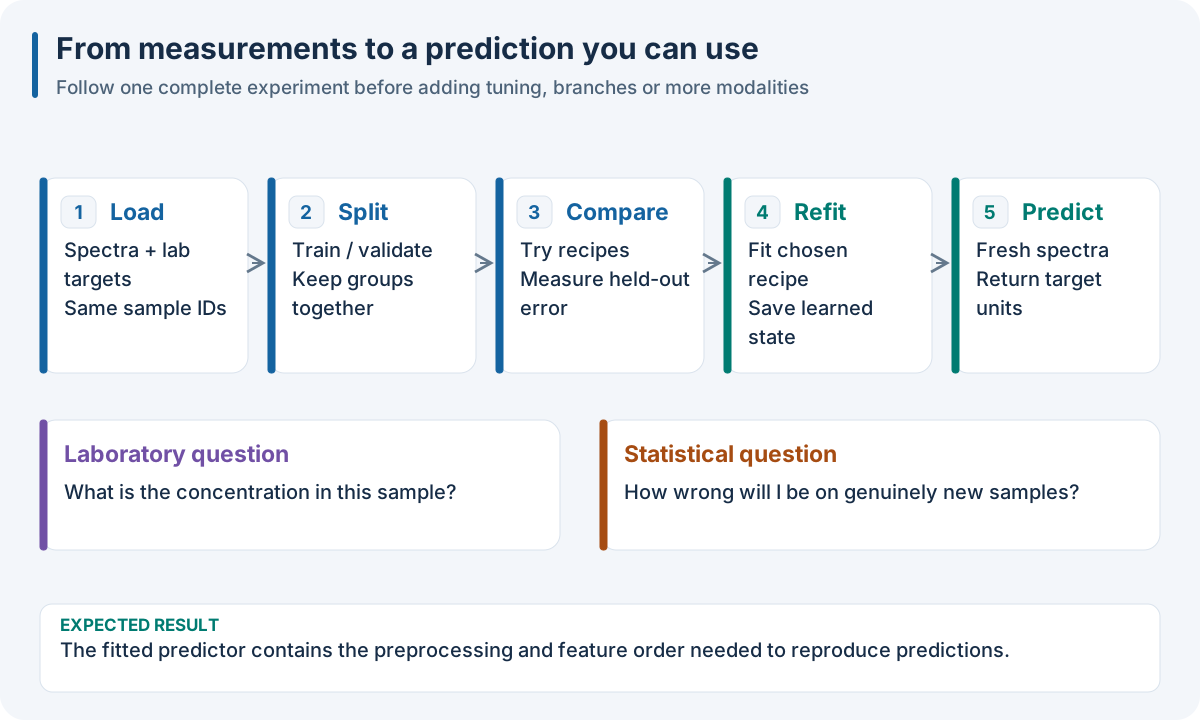
What this code will do. Standardization learns one mean and scale per feature. Each alpha produces a separate Ridge fit. Validation selects one candidate; full refit learns the final state before export.
{
  "steps": [
    {
      "method_id": "preprocessing.scaling.standard_scale",
      "role": "transformer",
      "params": {}
    },
    {
      "method_id": "models.regularized.ridge",
      "role": "regressor",
      "params": {
        "scale_x": false
      }
    }
  ],
  "candidates": [
    {
      "alpha": 0.1
    },
    {
      "alpha": 1.0
    }
  ]
}
steps:
  - method_id: preprocessing.scaling.standard_scale
    role: transformer
    params: {}
  - method_id: models.regularized.ridge
    role: regressor
    params: {scale_x: false}
candidates:
  - {alpha: 0.1}
  - {alpha: 1.0}
import json
from pathlib import Path
from nirs4all_core import run_pipeline

data = json.loads(Path("dataset.json").read_text())
recipe = json.loads(Path("ridge.recipe.json").read_text())
model = run_pipeline(data, recipe)
model.export("ridge.native.json")
print(model.outcome["effective_plan"]["variants"])
library(nirs4all)
data <- jsonlite::fromJSON("dataset.json", simplifyVector = FALSE)
recipe <- jsonlite::fromJSON("ridge.recipe.json", simplifyVector = FALSE)
model <- nirs4all_run_pipeline(data, recipe)
nirs4all_pipeline_export(model, "ridge.native.json")
model = nirs4all.runPipeline(fileread('dataset.json'), ...
                            fileread('ridge.recipe.json'));
model.export('ridge.native.json');
import {runBrowserPipeline} from 'nirs4all';

const data = await (await fetch('./dataset.json')).json();
const pipeline = await (await fetch('./ridge.recipe.json')).json();
const model = await runBrowserPipeline(data, {pipeline});
localStorage.setItem('ridge-model', model.export());
console.log(model.outcome.effective_plan.variants);
Read the recipe from top to bottom:
standard_scalestandardizes each of the seven feature columns using training statistics.ridgepredicts the numeric target from those transformed columns.scale_x: falseavoids standardizing twice inside the model.candidatesrequests two alternative fits. It does not combine their predictions.
Expected result: the plan contains two candidate variants; the selected predictor retains the scaler and Ridge state. CPU tabs write ridge.native.json. The browser stores its own exported package under ridge-model. Numerical scores depend on the data and runtime; inspect the actual outcome instead of expecting a fixed benchmark number.
Step 4 · Reload and predict
Open a new process or browser session and follow 10. Run the same recipe in your language. It includes the complete reload/predict box for the same model, and explains how to retain the trained feature declaration in WASM.
Expected result: two predictions, attached to the two requested sample IDs. No target labels are needed and no fitting occurs during prediction. The browser package is reloaded with the browser loader; use the CPU loader for the CPU export.
Optional · Run the full Python SDK example
Choose this route when you need sklearn-compatible Python objects. It creates 60 synthetic observations and uses StandardScaler → three-fold CV → two-component PLS. This is a second example with a different model; it is not a translation of the Ridge recipe above.
{
  "pipeline": [
    {"class": "sklearn.preprocessing.StandardScaler"},
    {"class": "sklearn.model_selection.KFold",
     "params": {"n_splits": 3, "shuffle": true, "random_state": 17}},
    {"model": {"class": "sklearn.cross_decomposition.PLSRegression",
               "params": {"n_components": 2}}}
  ]
}
pipeline:
  - class: sklearn.preprocessing.StandardScaler
  - class: sklearn.model_selection.KFold
    params:
      n_splits: 3
      shuffle: true
      random_state: 17
  - model:
      class: sklearn.cross_decomposition.PLSRegression
      params:
        n_components: 2
import numpy as np
import nirs4all
from sklearn.cross_decomposition import PLSRegression
from sklearn.model_selection import KFold
from sklearn.preprocessing import StandardScaler

rng = np.random.default_rng(17)
X = rng.normal(size=(60, 12))
y = 2.0 * X[:, 0] - X[:, 1] + rng.normal(scale=0.1, size=60)
pipeline = [
    StandardScaler(),
    KFold(n_splits=3, shuffle=True, random_state=17),
    {"model": PLSRegression(n_components=2)},
]
result = nirs4all.run(
    pipeline, (X, y), engine="dag-ml", name="first-regression",
    random_state=17, refit=True, save_artifacts=True, save_charts=False,
)
try:
    print("Engine:", result.execution_engine)
    print("CV selection score:", result.cv_best_score)
    print("Refit test score:", result.final_score)
    print(result.top(n=3, display_metrics=["rmse", "r2"]))
finally:
    result.close()
This example uses Python SDK objects. An equivalent public operation is unavailable in this host. Use the shared native recipe in 10. Run the same recipe in your language for the executable cross-language path.
This example uses Python SDK objects. An equivalent public operation is unavailable in this host. Use the shared native recipe in 10. Run the same recipe in your language for the executable cross-language path.
This example uses Python SDK objects. An equivalent public operation is unavailable in this host. Use the shared native recipe in 10. Run the same recipe in your language for the executable cross-language path.
The JSON/YAML tabs contain the same SDK recipe. Save one as first-pipeline.json or .yaml and pass its filename in place of pipeline; the Python arrays remain the input dataset. These class paths construct Python operators and are not native method IDs.
The scaler estimates column statistics inside the training folds; PLS learns two target-related directions. cv_best_score describes candidate-selection evidence. There is no separate external test cohort in (X, y), so final_score does not establish external test performance. result.close() releases its resources.
Checkpoint: identify raw X, target y, candidate choices, validation and the exported fitted state. Continue to 2. Understand what the pipeline learns before increasing complexity.