8. Save a predictor and use it on new observations
Your goal: close the training process, reload the complete predictor and obtain new estimates without training again.
Imagine standardization learned training mean 4 and scale 1.633 for one feature. New value 8 must still become about 2.449 using those saved numbers. Re-estimating a mean from the prediction batch would change the recipe’s meaning. Save the transformations together with the regression model.
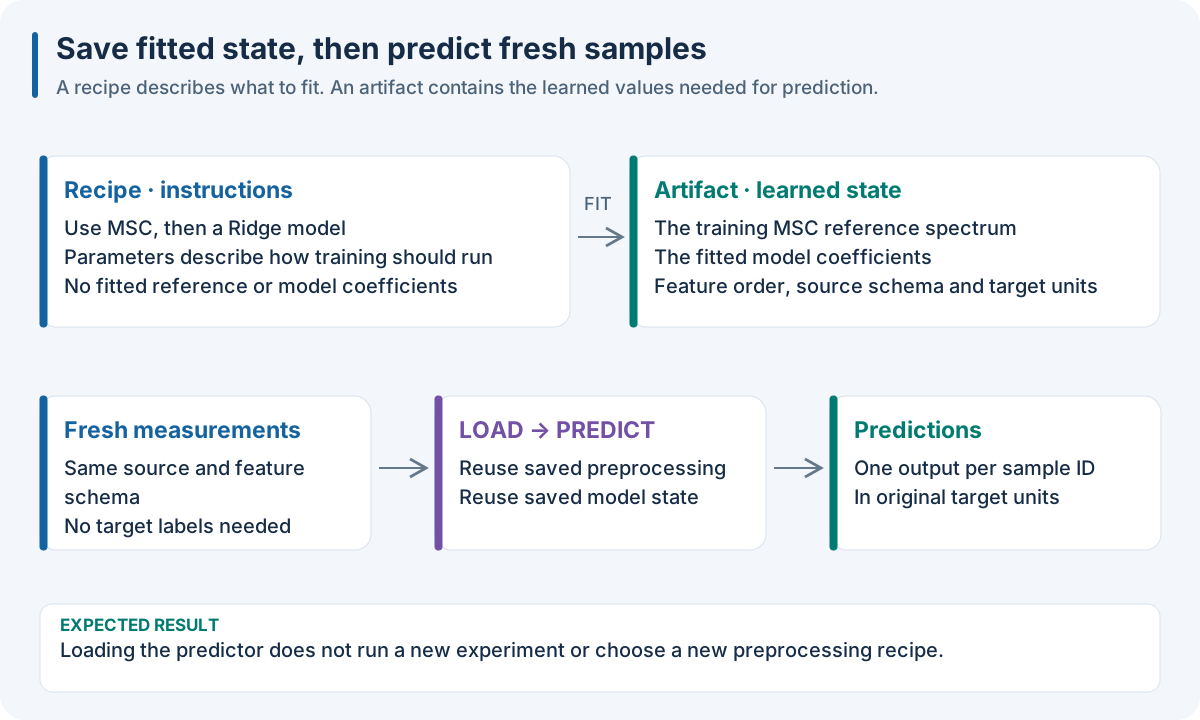
Save learned state, then reuse it. The recipe specifies operations and settings. The fitted predictor also contains means, scales, selected variables and coefficients. New data enter that frozen predictor in the same raw feature/source order.
Step 1 · Choose the artifact you need
Artifact |
Holds |
Use when |
|---|---|---|
Recipe JSON/YAML |
Ordered steps and settings |
You want to train another model |
Native pipeline JSON |
Recipe, result and learned role-node state |
You will reload the finite recipe from 1. Run your first complete experiment |
Model archive |
Complete supported fitted predictor and input schema |
You will deploy a supported archive profile |
Workflow export |
Workflow choices, outcome and model transport |
You will continue that product’s workflow |
Workspace snapshot |
Experiments, metadata, predictions and models |
You will relocate the full scientific record |
Host model bundle |
Python/R/JS library-specific state |
Your consumer has the compatible host libraries |
The filename is a useful label, but the producing API defines the artifact. A JSON recipe has no fitted coefficients. A workspace snapshot is more than a single predictor.
Step 2 · Close the producer and reload
Run 1. Run your first complete experiment first. Then start a new process with only the exported model, predict.json and the installed runtime available. The JSON/YAML tabs below show an example prediction-input shape; the language tabs use the real two-row download.
{
  "x": [
    [
      0.1,
      0.2,
      0.3,
      0.4,
      0.5,
      0.6,
      0.7
    ]
  ],
  "sample_ids": [
    "new:0"
  ]
}
x:
  - [0.1, 0.2, 0.3, 0.4, 0.5, 0.6, 0.7]
sample_ids: ["new:0"]
import json
from pathlib import Path
from nirs4all_core import NativePipeline

model = NativePipeline.load("ridge.native.json")
fresh = json.loads(Path("predict.json").read_text())
output = model.predict(fresh["x"], sample_ids=fresh["sample_ids"])
block = output["outputs"][0]["predictions"][0]
assert block["sample_ids"] == fresh["sample_ids"]
assert {event["phase"] for event in output["lineage"]} == {"PREDICT"}
print(block)
library(nirs4all)
model <- nirs4all_pipeline_load("ridge.native.json")
fresh <- jsonlite::fromJSON("predict.json")
output <- nirs4all_pipeline_predict(model, fresh$x,
                                   sample_ids = fresh$sample_ids)
print(output$outputs[[1]]$predictions[[1]])
model = nirs4all.NativePipeline.load('ridge.native.json');
fresh = jsondecode(fileread('predict.json'));
output = model.predict(fresh.x, 'sampleIds', fresh.sample_ids);
disp(output.outputs);
import {loadBrowserPipeline} from 'nirs4all';
import {dataset} from '@nirs4all/io-wasm/public-dataset';

const model = await loadBrowserPipeline(localStorage.getItem('ridge-model'));
const training = await (await fetch('./dataset.json')).json();
const fresh = await (await fetch('./predict.json')).json();
// Preserve the trained wavelength/source declarations, replace sample values.
const input = structuredClone(dataset(training).toJSON());
input.origin_ids = [...fresh.sample_ids];
input.fold_ids = fresh.sample_ids.map(() => null);
input.dataset.sample_ids = [...fresh.sample_ids];
input.dataset.y = null;
input.dataset.groups = null;
input.dataset.partitions = {dtype: '<U7', shape: [fresh.x.length],
  values: fresh.sample_ids.map(() => 'predict')};
const source = input.dataset.sources[0];
source.sample_ids = [...fresh.sample_ids];
source.array.shape[0] = fresh.x.length;
source.array.values = fresh.x;
const output = await model.predict(input);
console.log(output.outputs[0].predictions[0]);
Expected result: two predicted rows with exactly the requested IDs. The Python assertion verifies prediction-only lineage. Confirm the same property with the documented consumer when deploying another host; executing only Python does not verify an R or browser installation.
The WASM tab preserves the trained source declaration and replaces observation values/IDs for this complete single-source fixture. For a richer multimodal prediction cohort, build an IO dataset with the same source declarations and explicit presence masks.
Step 3 · Compare prediction values and identities
Save a reference prediction from the original fitted model on the same raw new inputs.
Reload in the intended consumer and predict those inputs.
Compare every target value using an appropriate stated numerical tolerance.
Compare sample IDs, target names, shape and order exactly.
Confirm no fitting or hyperparameter search occurs during replay.
An array with correct numbers attached to the wrong samples is still a wrong result. For multimodal data, join each input source by sample ID before prediction.
Step 4 · Check input compatibility
Saved expectation |
New data must preserve |
Example of a mismatch |
|---|---|---|
Ordered features |
Same meaning and order |
Wavelength columns sorted differently |
Physical coordinates |
Same coordinates and units |
Nanometres replaced by wavenumbers |
Sources |
Same names and representations |
Image tensor substituted for a spectrum |
Shape |
Same non-sample dimensions |
Image channel count changes |
Categories |
Supported vocabulary/unknown-category policy |
An unseen instrument name |
Targets |
Trained names and order, without inference labels |
Targets silently reversed |
Supply raw measurements when the saved predictor already owns preprocessing. Feeding SNV-corrected measurements into a predictor that applies SNV again changes the input.
Does my model cross languages?
Native numerical methods have supported portable state profiles. Host-specific Python, R or JavaScript models usually need their original libraries. Check the producer, consumer and model family in the execution matrix; the shared finite native recipe in 10. Run the same recipe in your language is the starting example.
CPU → browser prediction, browser → CPU prediction, retraining and new calibration are separate operations. Demonstrating one does not automatically demonstrate another. Use the exact text loader for native packages in JavaScript so large signed integers are not rounded during parse/re-encoding.
Advanced: browser/CPU tuning and calibration transport
The bounded browser SNV/Savitzky–Golay/PLS tuning producer exports
nirs4all.browser-tuning.v1 with an initial-full-refit package. Python Core
load_browser_tuning(record_or_path).predict(prediction_dataset) validates its
native package, HPO request/search/checkpoint provenance and frozen source
binding, then rehydrates Methods state and predicts on CPU without FIT.
Target-free prediction rows must retain the trained source schema. Loading this
record does not resume its browser optimizer on CPU.
In the reverse direction, a supported CPU Archive V2 with C-native Methods
state can be loaded by the browser consumer. The methods.pls replay profile
also supports browser conformal calibration from real calibration inputs via
DAG’s controller replay. Calibration predicts with the frozen model and fits a
calibrator; it does not refit the predictor. Use disjoint calibration and test
cohorts with explicit IDs. The initial browser HPO role-pipeline package and a
CPU Archive V2 remain separate contracts.
Generic N4ME operator replay and these bounded tuning/calibration profiles have separate qualification evidence. Neither implies support for arbitrary host weights, every optimizer, every operator or every cross-language archive path.
For the native PLS-LDA classification profile, the independent reference uses
sklearn PLS scores followed by NumPy class statistics and pooled covariance
normalized by (n - k) (observations minus classes). It is not exact parity
with sklearn LDA’s SVD solver. This profile does not expose predict_proba.
Class identity, masks and predictions require their own classification checks;
regression parity alone does not qualify them.
Diagnose a deployment problem
Symptom |
First check |
Next action |
|---|---|---|
Missing method/runtime |
Installed packages and method version |
Use the supported runtime cohort |
Wrong feature count/order |
Trained source schema versus new input |
Restore original feature meaning and order |
Duplicate/misaligned IDs |
IDs across the new sources |
Join by IDs and reject duplicates |
Artifact validation failure |
Original exported bytes and loader |
Restore export; avoid manual signed-metadata edits |
Fits occur while predicting |
Model state and operation being called |
Load the fitted model and call prediction |
Wrong output associations |
Prediction IDs and target order |
Retain identities while writing the output |
Checkpoint: close the producer, reload in your intended language, and reproduce predictions on raw new data. Continue to 9. Choose transforms and models for a reason to choose richer transforms and models for a scientific reason.