7. Read the result and keep a useful experiment record
Your goal: identify which recipe won, inspect held-out predictions, and save enough evidence to explain the result later.
A result should answer four questions: What data? Which recipe? Which evaluation? Which model can I reuse? Start with one completed run before combining several experiments.
Inspect the first native experiment
This continues 1. Run your first complete experiment. Reload the CPU export in Python/R/Octave, or the browser export in WASM. Read its effective plan and learned final nodes.
JSON/YAML are recipe and data formats, not result-query languages. Inspect the outcome with one of the language APIs in this box; keep the original exported package intact.
JSON/YAML are recipe and data formats, not result-query languages. Inspect the outcome with one of the language APIs in this box; keep the original exported package intact.
from nirs4all_core import NativePipeline
model = NativePipeline.load("ridge.native.json")
plan = model.outcome["effective_plan"]
print("Candidates:", len(plan["variants"]))
print("Folds:", len(plan["fold_set"]["folds"]))
print("Learned final nodes:", len(model.outcome["execution_bundle"]["refit_artifacts"]))
library(nirs4all)
model <- nirs4all_pipeline_load("ridge.native.json")
plan <- model$outcome$effective_plan
print(length(plan$variants))
print(length(plan$fold_set$folds))
print(length(model$outcome$execution_bundle$refit_artifacts))
model = nirs4all.NativePipeline.load('ridge.native.json');
plan = model.outcome.effective_plan;
disp(numel(plan.variants));
disp(numel(plan.fold_set.folds));
disp(model.outcome.execution_bundle.refit_artifacts);
import {loadBrowserPipeline} from 'nirs4all';
const model = await loadBrowserPipeline(localStorage.getItem('ridge-model'));
const plan = model.outcome.effective_plan;
console.log('Candidates:', plan.variants.length);
console.log('Folds:', plan.fold_set.folds.length);
console.log('Learned final nodes:', model.outcome.execution_bundle.refit_artifacts.length);
Expected result: two candidate variants and two learned refit nodes, the scaler and Ridge. Inspect the effective fold count from the actual outcome rather than guessing it from the number of candidates. A candidate, a fold and an observation are different counts.
Interpret scores before ranking models
Result field in Python SDK |
What it tells you |
Check |
|---|---|---|
|
Which runtime executed the recipe |
Matches the intended example |
|
Candidate selected using CV evidence |
Recipe parameters and ranking metric |
|
Its selection score |
Metric direction and CV aggregation |
|
Final refit prediction entry, where present |
Distinct from the temporary fold fits |
|
Refit test score, when an external test cohort exists |
The test set was not used to select candidates |
|
Ranked stored entries |
Ranking partition and metric |
|
Number of stored prediction entries |
Not the number of independent specimens |
For the Python SDK exercise in 1. Run your first complete experiment, inspect the result inside its try block before result.close():
This example uses Python SDK objects. An equivalent public operation is unavailable in this host. Use the shared native recipe in 10. Run the same recipe in your language for the executable cross-language path.
This example uses Python SDK objects. An equivalent public operation is unavailable in this host. Use the shared native recipe in 10. Run the same recipe in your language for the executable cross-language path.
print("Engine:", result.execution_engine)
print("Stored prediction entries:", result.num_predictions)
print("Datasets:", result.get_datasets())
print("Models:", result.get_models())
print("CV winner:", result.cv_best)
print("CV score:", result.cv_best_score)
print("Final entry:", result.final)
print("Final test score:", result.final_score)
for entry in result.top(n=3, display_metrics=["rmse", "r2"]):
    print(entry)
This example uses Python SDK objects. An equivalent public operation is unavailable in this host. Use the shared native recipe in 10. Run the same recipe in your language for the executable cross-language path.
This example uses Python SDK objects. An equivalent public operation is unavailable in this host. Use the shared native recipe in 10. Run the same recipe in your language for the executable cross-language path.
This example uses Python SDK objects. An equivalent public operation is unavailable in this host. Use the shared native recipe in 10. Run the same recipe in your language for the executable cross-language path.
A stored entry identifies a model/variant, fold and partition. Read its sample IDs and target names before extracting row-level values. An absent external test score does not mean training failed; it means that no such external evidence was supplied.
Use figures to ask specific questions
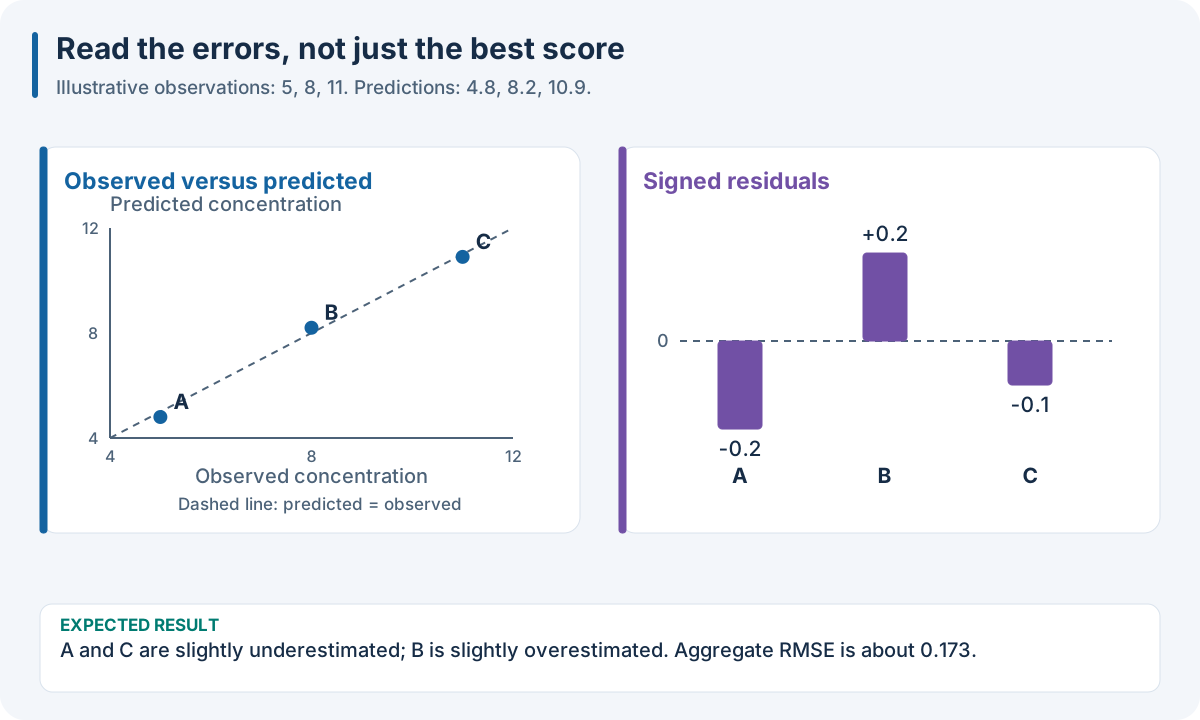
Two complementary diagnostics. Points near the identity line have small prediction errors. Residuals should be inspected for bias, concentration-dependent patterns and acquisition-group differences. The teaching values are observed [5, 8, 11], predicted [4.8, 8.2, 10.9], and residuals [-0.2, 0.2, -0.1]; their RMSE is approximately 0.173 in arbitrary target units. Inspect your actual held-out observations the same way.
Diagnostic |
What to look for |
Report beside it |
|---|---|---|
Predicted versus observed |
Offset, slope bias, poor extremes |
Target unit, partition, sample count and RMSE |
Residual versus observed |
Error changing with concentration |
Residual sign and target range |
Residual by batch/instrument |
Acquisition-specific errors |
Group counts and group-specific metric |
Fold-score comparison |
Variation and candidate consistency |
Values, fold sizes and pooled/mean convention |
Confusion matrix |
Which classes are mistaken for which |
Class names, counts and class recall |
Coverage/interval width |
Uncertainty useful for decisions |
Requested/observed coverage and width units |
The prediction-chart guide gives plotting APIs. A classification result is needed for a confusion matrix; a regression outcome is not its input.
What should you save?
You want to… |
Save… |
Contains |
|---|---|---|
Reproduce the scientific comparison |
Dataset declaration, recipe and experiment |
Folds, predictions, metrics and candidate identities |
Predict new observations |
Complete fitted model export |
Learned preprocessing/model state and expected input schema |
Compare many runs |
Workspace or result collection |
Runs, score tables and prediction arrays |
Resume a supported optimizer |
Its actual checkpoint |
Search identity, completed history and optimizer state |
Explain intervals |
Calibrator with the fixed predictor |
Coverage settings and calibration evidence |
A model archive is smaller than the full workspace because deployment does not need every candidate’s historical predictions. Retain both when your scientific report needs traceability and your application needs a standalone predictor.
Make a report someone else can read
Use a small record like this before adding plots:
Field |
Example description |
|---|---|
Question |
Predict moisture, in percent, for a new specimen |
Data |
NIR wavelengths and laboratory markers; acquisition campaign identified |
Independent unit |
Specimen; three scans remain grouped |
Evaluation |
Three group folds; separate later-campaign test set |
Search |
SNV/MSC × 2/4/6 PLS components; eighteen fold fits |
Selection |
Minimize pooled validation RMSE |
Selected recipe |
Record the actual winning settings |
Final assessment |
Record external test RMSE and specimen count |
Saved model |
Export path, required source order and runtime |
This is an example reporting template, not a measured experimental result. Supply your actual counts, scores and settings. A single model name and score are insufficient to explain a comparison.
Workspaces and sessions
A workspace stores runs, metadata, predictions and models. A session keeps execution or loaded-predictor resources open. Use public export/import APIs to relocate a workspace, and close results/sessions after use. The interoperability exercise shows native model and workspace relocation separately.
The full SDK uses SQLite metadata, Parquet prediction arrays and stored artifacts. The native result directory and a browser workflow record have different layouts. Use the loader corresponding to the producer API; changing an extension does not convert a workspace into a model.
Advanced: portable workspace readers and their requirements
Core exposes save_workspace, open_workspace and import_workspace. Its Workspace queries runs() and query_predictions(native_run_id) and opens a closeable native prediction session with session(native_run_id). Export creates an immutable .n4w snapshot.
R uses nirs4all_workspace_* functions. Octave exposes Workspace.runs, .predictions, .session, .export and .close. These bridges require a Python executable with Core and the full SDK installed. Browser openWorkspace(indexBytes, members) validates hashes and native experiments; it does not become a SQLite engine.
Workspace loading checks file inventories and relationships between scores, prediction arrays and selected models. Active journals or changed links can be refused. Consult Workspace Architecture and Storage API Reference for exact layouts and validation rules.
Checkpoint: write a report naming the ranking metric, validation data, winner and saved predictor. Continue to 8. Save a predictor and use it on new observations.