Move a native model or a complete experiment
Your goal: use a model in another supported CPU host, or relocate a full workspace without losing the data needed to explain your result. These are two different exercises.
Start with 10. Run the same recipe in your language for one recipe and 8. Save a predictor and use it on new observations for cold prediction. This chapter adds the packaging and workspace details you need when handing the work to a colleague.
Exercise A · Predict from another CPU language
Fit the StandardScaler → Ridge recipe in 1. Run your first complete experiment in Python Core, R or Octave.
Keep the original
ridge.native.jsonandpredict.jsonfiles.Close the producer. Move the files to the colleague’s machine or directory.
Run the colleague’s language reload tab in 10. Run the same recipe in your language.
Compare the complete predicted matrix numerically and sample/target IDs exactly.
The CPU pipeline facade uses the same supported package across these hosts. Node’s NativePipeline.load takes exact text rather than a path or parsed object. A browser pipeline has its own browser loader and package; use the direction-specific supported archive route for CPU/browser transport.
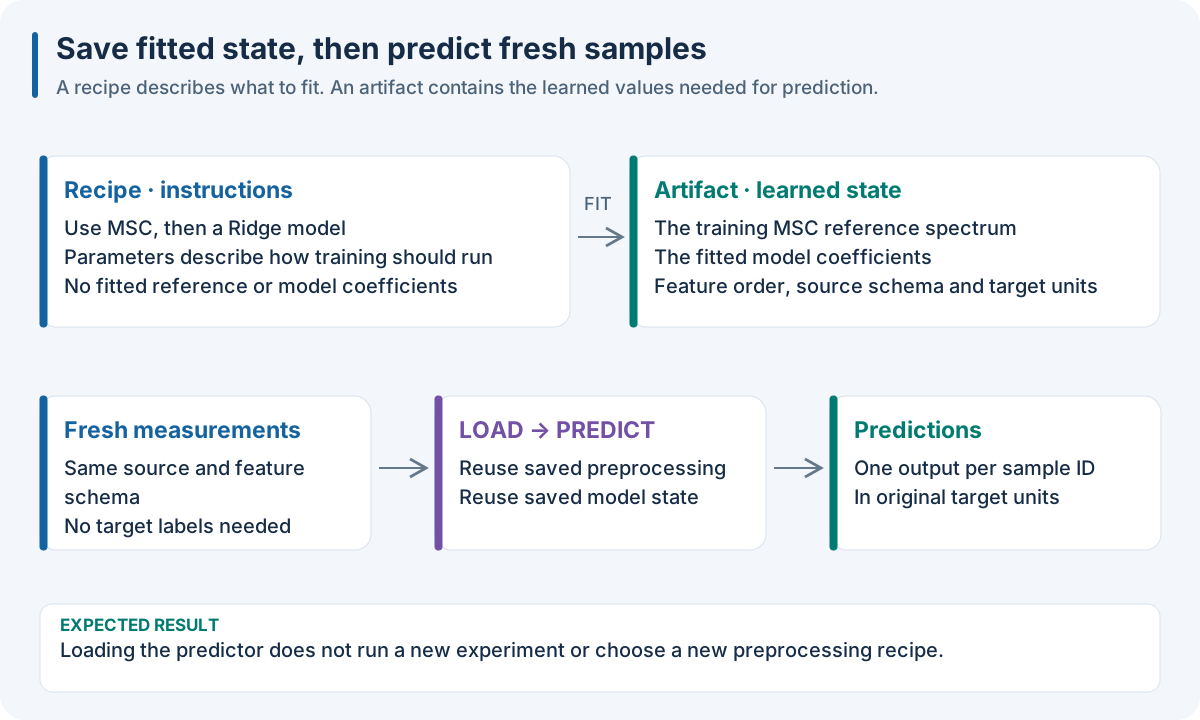
The handoff contains learned state. Sharing only a recipe would ask the recipient to train again. The saved predictor carries the transformations and model needed for the same computation.
Compare exactly |
Compare with a stated numerical tolerance |
|---|---|
Requested sample IDs and order |
Every predicted target value |
Target names and order |
The whole matrix, not just the first cell |
Output dimensions |
Any profile-specific numerical reference |
Prediction-only replay phase |
Producer versus consumer replay |
Use matching installed Core, IO, DAG and Methods versions, and configure the Methods library path as in 1. Run your first complete experiment. Current Python Core wheels execute through their embedded dispatcher; R, Octave and Node CPU need the matching external CLI. A browser loads WASM modules instead of these CPU files.
Exercise B · Relocate the scientific workspace
A workspace contains scores and prediction arrays as well as selected models. This exercise needs an existing supported SDK workspace named workspace-source, containing a native run with a portable selected predictor. It is not the finite ridge.native.json file. Provide raw predict.json compatible with that workspace model’s feature count/order.
Choose fresh destinations: snapshot.n4w and workspace-relocated must not already exist. R and Octave workspace bridges need a Python installation with Core and the full SDK. Set NIRS4ALL_WORKSPACE_PYTHON if its executable is not the default python3.
A workspace snapshot is a stored experiment, not a JSON/YAML recipe. The full SDK relocation/query/session bridge shown here is a CPU operation. Browser openWorkspace reads validated bytes and native experiments; it does not provide this SQLite/Parquet importer. Use Python, R or Octave for this exercise.
A workspace snapshot is a stored experiment, not a JSON/YAML recipe. The full SDK relocation/query/session bridge shown here is a CPU operation. Browser openWorkspace reads validated bytes and native experiments; it does not provide this SQLite/Parquet importer. Use Python, R or Octave for this exercise.
import json
from pathlib import Path
from nirs4all_core import open_workspace, import_workspace

fresh = json.loads(Path("predict.json").read_text())
with open_workspace("workspace-source") as source:
    run_id = source.runs()[0]["native_run_id"]
    rows = source.query_predictions(run_id)
    snapshot = source.export("snapshot.n4w")
with import_workspace(snapshot, "workspace-relocated") as relocated:
    assert len(relocated.query_predictions(run_id)) == len(rows)
    session = relocated.session(run_id)
    try:
        prediction = session.predict(fresh["x"], sample_ids=fresh["sample_ids"])
        print(prediction.y_pred)
    finally:
        session.close()
library(nirs4all)
fresh <- jsonlite::fromJSON("predict.json")
source <- nirs4all_open_workspace("workspace-source")
run_id <- nirs4all_workspace_runs(source)[[1]]$native_run_id
rows <- nirs4all_workspace_predictions(source, run_id)
snapshot <- nirs4all_workspace_export(source, "snapshot.n4w")
nirs4all_workspace_close(source)
relocated <- nirs4all_import_workspace(snapshot, "workspace-relocated")
session <- nirs4all_workspace_session(relocated, run_id)
tryCatch({
  print(nirs4all_workspace_predict(session, fresh$x, fresh$sample_ids))
}, finally = {
  nirs4all_workspace_close(session)
  nirs4all_workspace_close(relocated)
})
fresh = jsondecode(fileread('predict.json'));
source = nirs4all.Workspace('workspace-source');
runs = source.runs(); run_id = runs(1).native_run_id;
rows = source.predictions(run_id);
snapshot = source.export('snapshot.n4w');
source.close();
relocated = nirs4all.Workspace.importSnapshot(snapshot, 'workspace-relocated');
cleanup = onCleanup(@() relocated.close());
session = relocated.session(run_id);
output = session.predict(fresh.x, fresh.sample_ids);
disp(output);
session.close();
A workspace snapshot is a stored experiment, not a JSON/YAML recipe. The full SDK relocation/query/session bridge shown here is a CPU operation. Browser openWorkspace reads validated bytes and native experiments; it does not provide this SQLite/Parquet importer. Use Python, R or Octave for this exercise.
Expected result: the relocated workspace retains the run and prediction evidence. Its loaded session predicts new measurements using the saved selected model without fitting. Python compares the number of stored prediction rows before/after relocation; also inspect the identities and values if this handoff is part of a scientific report.
Closing the parent workspace invalidates its child sessions. Export before closing, then close both session and workspace when finished. The R/Octave bridges issue commands through Python and reopen/validate stored resources for each command; they are not an open SQL database connection.
Choose the loader by what you saved
Producer |
Saved artifact |
Consumer |
|---|---|---|
Finite native |
Exact native package JSON |
CPU |
Browser |
Browser native pipeline package |
|
Supported native training/archive |
Archive V2 |
Its documented archive/workflow consumer |
SDK workspace export |
|
Workspace importer/host gateway |
Browser tuning |
|
Its supported browser/CPU transport API |
Prediction support, retraining support and optimizer resume are separate capabilities. Loading browser tuning state on CPU can reuse the predictor without continuing the browser optimizer there. Read the precise directions in 8. Save a predictor and use it on new observations.
Do not lose identity while adapting arrays
Keep rows as observations and columns as the trained feature sequence. Keep one-row inputs as matrices in R (drop = FALSE). Keep source order, feature names, physical coordinates and units. For multiple sources, join by sample IDs; a correct-looking row count is not enough.
A live runtime handle points to memory in its process. A saved fitted artifact preserves scientific state for another process. Export the artifact rather than persisting a handle or object address.
Advanced: masked targets and workspace validation
Native masked regression projections explicitly preserve target names and observation masks. Classification labels have separate dtype/exact-representation requirements. Missing labels do not become invented target zeros; false mask cells are placeholders excluded from fitting/scoring. Read Public execution matrix before mixing partial targets with a model profile.
Workspace loading validates closed file inventories, hashes and links between runs, scores, predictions and models. It can reject active SQLite journals, altered metrics or inconsistent relationships even when files exist. Browser workspace readers validate hashes and native experiments; the Python gateway checks SDK SQLite/Parquet semantics before exporting the snapshot.
Checkpoint: identify whether your colleague needs only prediction or the full experiment record. Hand over the corresponding artifact and verify the actual consumer.