Operator steps: describe an algorithm and its settings
An operator is the algorithm doing one job: standardize features, smooth spectra, extract PCA scores, or fit a prediction model. A pipeline node places that algorithm in the workflow.
JSON and YAML describe the operator by its import path and constructor settings.
Python can use the same description or an already-created object. The role
model makes a supervised learner explicit.
Worked example: standardize, compress, predict
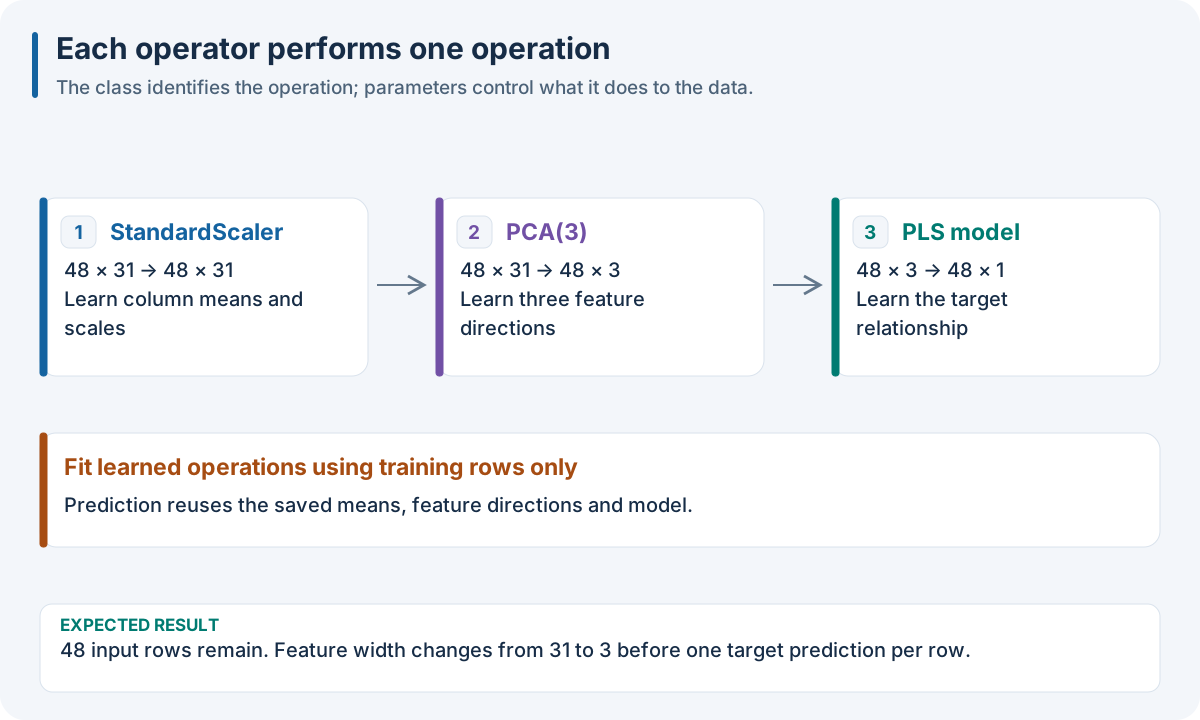
Constructor settings decide algorithm capacity: PCA n_components 3 changes 31 features into three scores. A display name only labels the step.
Note
These tabs express the same Python SDK workflow. JSON and YAML are recipe files; Python can also use sklearn/nirs4all objects. R, Octave and WASM native pipeline facades do not execute this host-controller node directly. For a recipe that runs in those languages, use 10. Run the same recipe in your language.
{
  "pipeline": [
    {
      "split": {
        "class": "sklearn.model_selection.KFold",
        "params": {
          "n_splits": 3,
          "shuffle": true,
          "random_state": 17
        }
      }
    },
    {
      "class": "sklearn.preprocessing.StandardScaler"
    },
    {
      "class": "sklearn.decomposition.PCA",
      "params": {
        "n_components": 3
      }
    },
    {
      "model": {
        "class": "sklearn.cross_decomposition.PLSRegression",
        "params": {
          "n_components": 3
        }
      }
    }
  ]
}
pipeline:
- split:
    class: sklearn.model_selection.KFold
    params:
      n_splits: 3
      shuffle: true
      random_state: 17
- class: sklearn.preprocessing.StandardScaler
- class: sklearn.decomposition.PCA
  params:
    n_components: 3
- model:
    class: sklearn.cross_decomposition.PLSRegression
    params:
      n_components: 3
import tempfile
import numpy as np
import nirs4all
from nirs4all.data.dataset import SpectroDataset
from sklearn.model_selection import KFold
from sklearn.preprocessing import StandardScaler
from sklearn.decomposition import PCA
from sklearn.cross_decomposition import PLSRegression

rng = np.random.default_rng(17)
X = rng.normal(size=(48, 31))
y = 2 * X[:, 10] - X[:, 20] + rng.normal(scale=0.1, size=48)
dataset = SpectroDataset("worked_node")
dataset.add_samples(X[:40], {"partition": "train"},
                    headers=[str(i) for i in range(31)])
dataset.add_samples(X[40:], {"partition": "test"})
dataset.add_targets(y.reshape(-1, 1))


pipeline = [
    KFold(n_splits=3, shuffle=True, random_state=17),
    StandardScaler(),
    PCA(n_components=3),
    {"model": PLSRegression(n_components=3)},
]
with tempfile.TemporaryDirectory() as workspace:
    result = nirs4all.run(pipeline, dataset, engine="legacy",
                         workspace_path=workspace, save_charts=False, verbose=0)
    print("CV validation score:", result.cv_best_score)
    print("Selected model test RMSE:", result.best_rmse)
    result.close()
What to expect: StandardScaler preserves 31 columns, PCA produces three columns, and PLS predicts one concentration per observation. Training learns scaler statistics, PCA axes and model coefficients; prediction reuses that state. The eight held-out rows remain eight rows throughout.
The Python tab uses idiomatic objects. JSON and YAML use the equivalent
class/params declarations, so the three tabs keep the same algorithm settings.
Enumerate supported forms
Form |
Meaning |
Use it for |
|---|---|---|
|
Import and instantiate a class |
Most JSON/YAML operators |
Full import-path string |
Instantiate using default parameters |
Short recipes without settings |
|
Import a callable |
Supported function/factory operators |
Direct Python object |
Use an instantiated operator |
Interactive Python |
|
Restore internal serialized state |
Generated internal artifacts; do not handwrite |
|
Constructor keyword arguments |
|
|
Display label |
Recognizable reports and traces |
|
Requested input representation |
Models with specific matrix/tensor requirements |
params configures construction. It is not the place for fitting-only arguments
such as training epochs; those belong in the model training configuration.
Use full import paths so a fresh process can reconstruct the component.
Name a step without changing the algorithm
{
  "class": "sklearn.decomposition.PCA",
  "params": {
    "n_components": 3
  },
  "name": "three_spectral_patterns"
}
class: sklearn.decomposition.PCA
params:
  n_components: 3
name: three_spectral_patterns
from sklearn.decomposition import PCA

pca_step = {'class': PCA, 'params': {'n_components': 3}, 'name': 'three_spectral_patterns'}
Expected result: exactly the same three PCA scores as an unnamed step with identical fitted data and settings. The name changes the report label only.
Choose a layout deliberately
With 48 observations, three equal-width views and 31 features:
|
Representation |
Appropriate consumer |
|---|---|---|
|
48 × 93, views concatenated |
Matrix learner |
|
48 × 93, view values interleaved by feature |
Matrix model designed for that order |
|
48 × 3 × 31 |
Tensor learner with view before feature |
|
48 × 31 × 3 |
Tensor learner with feature before view |
Changing layout reorders or reshapes features; it does not add data. A tensor request does not make an ordinary sklearn matrix estimator accept tensors. The source/view order becomes part of what a fitted model expects.
What is portable across languages?
A dotted sklearn... path asks the Python host to import sklearn. It does not
install sklearn inside R, Octave or a browser. A native recipe instead uses
supported method IDs through the native language facade. Use
10. Run the same recipe in your language for executable multi-language examples and
Operator catalog: choose a job, then inspect the method to choose actual supported methods.
Common mistakes
Calling a local notebook class portable: put custom classes in an importable module with a reproducible constructor.
Keeping learned state in an unexported object: export the fitted predictor for reuse in another process.
Confusing
namewith an algorithm orparamswith fitting arguments.Assuming JSON validity proves runtime support: check the chosen engine’s supported operators and pipeline shape.
Runnable source: U01 preprocessing basics. Continue with Preprocessing: change what the model sees, model: turn features into predictions, and Operator catalog: choose a job, then inspect the method.