y_processing: learn on one scale, report on another
Use target scaling when the reference numbers have an inconvenient numerical range, especially for optimization or multiple target columns. It changes y, the values to predict; feature preprocessing changes X.
A MinMaxScaler fitted to training targets [10, 20, 30] maps them to [0, 0.5, 1]. A prediction of 0.6 inverse-transforms to 22 in the original units. This is why an RMSE in concentration units must be computed after restoring that scale.
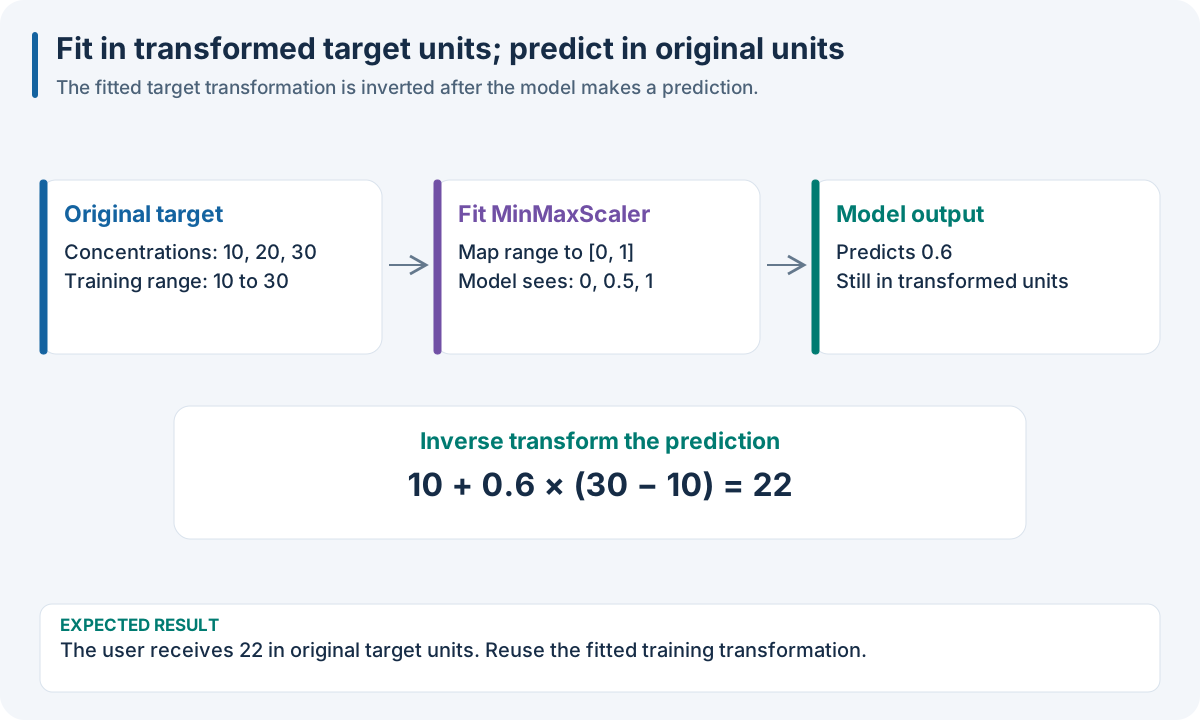
Educational reversible scaling. There is still one target column; only its numerical representation changes.
Worked recipe
Download dataset.json from 1. Run your first complete experiment. JSON/YAML can be saved as SDK pipeline files; the Python tab defines pipeline. The execution box below loads those same observations and runs this SDK recipe.
{
  "pipeline": [
    {
      "y_processing": {
        "class": "sklearn.preprocessing.MinMaxScaler"
      }
    },
    {
      "split": {
        "class": "sklearn.model_selection.KFold",
        "params": {
          "n_splits": 3
        }
      }
    },
    {
      "model": {
        "class": "sklearn.cross_decomposition.PLSRegression",
        "params": {
          "n_components": 2
        }
      }
    }
  ]
}
pipeline:
- y_processing:
    class: sklearn.preprocessing.MinMaxScaler
- split:
    class: sklearn.model_selection.KFold
    params:
      n_splits: 3
- model:
    class: sklearn.cross_decomposition.PLSRegression
    params:
      n_components: 2
from sklearn.preprocessing import MinMaxScaler
from sklearn.model_selection import KFold
from sklearn.cross_decomposition import PLSRegression

pipeline = [
    {"y_processing": MinMaxScaler()}, KFold(n_splits=3),
    {"model": PLSRegression(n_components=2)},
]
The JSON/YAML tabs define SDK recipes; the Python tab builds the same recipe with objects. These examples use Python SDK operators. The R, Octave and browser/WASM finite pipeline facade uses native method IDs, not Python import paths. Use 10. Run the same recipe in your language for its actual binding calls and 0. Choose the tools for your language to choose the runtime.
Choices and controls
Choice |
Numerical change |
Prediction interpretation |
|---|---|---|
|
Training range maps to an interval, default 0–1 |
Restore the original unit by inversion |
|
Each target column is centered/scaled |
Restore the original unit by inversion |
Reversible custom transform |
Application-specific change |
Needs a correct |
|
Concentrations become integer bin labels |
A class label; original continuous values are lost |
|
Values become declared interval labels |
A range/category, not an exact concentration |
List under |
Several operations in sequence |
Invert reversible operations in reverse order |
Expected result: X stays unchanged. Scaling preserves the number of target columns and returned regression predictions regain their units when inversion is supported. Discretization changes the task to classification.
Try it: fit the scaler to [10, 20, 30]; inverse-transform 0.6 and 1.2. The answers are 22 and 34: the future prediction is not clipped to the fitted range.
Common mistake: fitting the scaler on independent test targets. Its statistics belong to permitted training rows. Prediction does not need the true target merely to replay the fitted inverse.
The target path differs from the feature path
Target scaling changes the numerical learning problem. For example, scaling concentration to a compact interval can improve optimization, but a prediction must be returned to concentration units before reporting an RMSE in those units. A chain of reversible transforms is inverted in reverse order. Prediction inputs do not need true targets merely to replay a regression scaler.
A discretizer changes the task: concentration intervals become class labels. This is not ordinary reversible regression scaling. A target recipe containing a discretizer therefore defines a classification problem, rather than an exact inversion back to every original continuous value.
The legacy target controller fits on training-partition targets and tracks each processing ancestor and saved transformer. Fold-local target processing in DAG-ML uses the permitted fit cohort. Do not compute target scaling limits on the independent test targets outside the pipeline and then call that evaluation independent.
Check: fit the transform only on permitted targets, preserve target column order, verify inverse_transform, and report metrics in an explicit scale. For log transforms, handle the mathematical domain and the distinction between inverse-transforming a point prediction and estimating a mean on the original scale.
Worked source: stacking with target scaling. Transforms Reference lists the target discretizers.
Run the recipe on the downloadable observations
Install the full Python SDK as described in 1. Run your first complete experiment, execute the Python tab in the Worked recipe section to define pipeline, then run this box. It reads the first experiment’s complete single-source dense fixture into its numeric SDK arrays. The fixture has 12 rows × 7 features, one target and training rows only; its figures’ small numeric examples explain the mechanisms independently of the fixture’s fitted predictions.
import json
from pathlib import Path
import numpy as np
import nirs4all
from sklearn.model_selection import KFold
from sklearn.cross_decomposition import PLSRegression

# Download dataset.json, then run the Python tab in the Worked recipe section.
observations = json.loads(Path("dataset.json").read_text())["dataset"]
X = np.asarray(observations["sources"][0]["array"]["values"], dtype=float)
y = np.asarray(observations["y"]["values"], dtype=float)
complete_pipeline = pipeline
result = nirs4all.run(
    complete_pipeline, (X, y), engine="dag-ml",
    workspace_path="workspace-node-example", verbose=0,
)
validation = result.predictions.filter_predictions(partition="val")
print(validation[0]["val_score"])
Expected: a completed three-fold calibration, finite validation scores, and stored results in workspace-node-example. With no independent test rows in this teaching fixture, inspect val_score; a final-test convenience score may be absent/NaN. The chart recipe also saves its diagnostics. Keep your own study’s sample/source identities and group metadata when replacing this simple fixture.