split: define what must be unseen
A splitter assigns observations to training and validation roles. It makes the scientific question explicit: a new scan, a new physical sample, a new batch, or a future measurement. These are different evaluations.
With 12 independent samples and three-fold CV, each fit uses 8 training rows and predicts 4 held-out rows. Each row is validated once. The same 12 rows recur across folds; they do not become 36 independent samples.
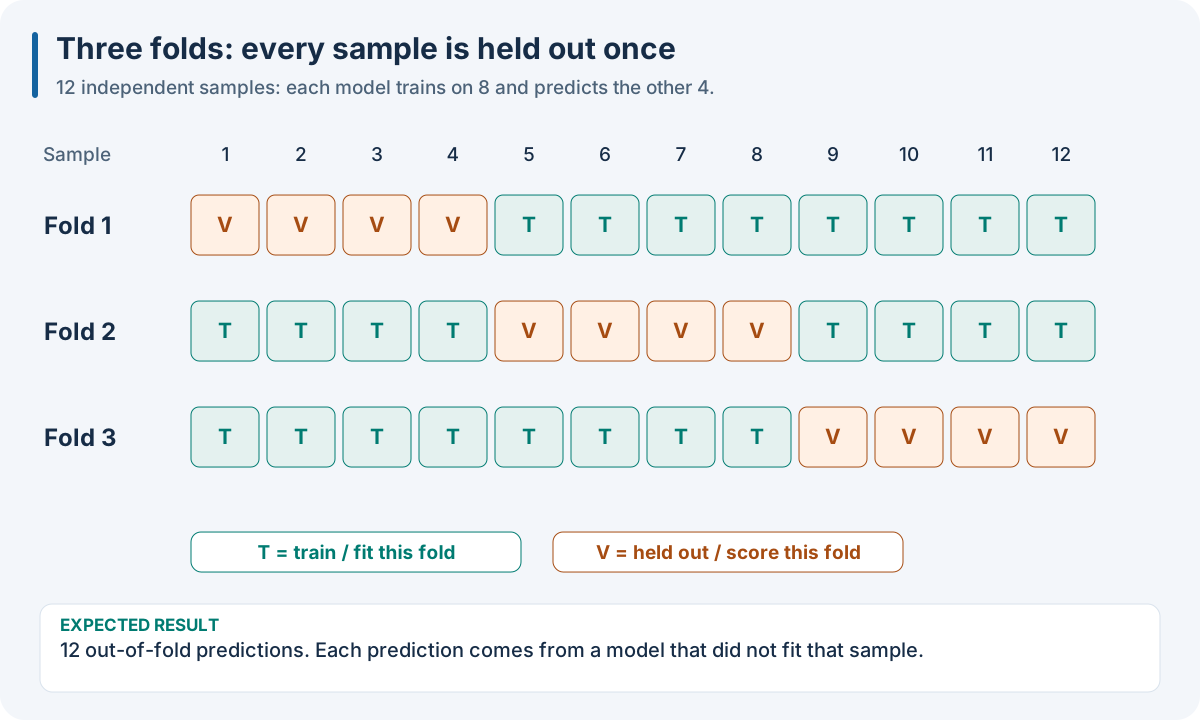
Educational 3-fold assignment. The final independent test population is separate from these validation cohorts.
Worked recipe
Download dataset.json from 1. Run your first complete experiment. JSON/YAML can be saved as SDK pipeline files; the Python tab defines pipeline. The execution box below loads those same observations and runs this SDK recipe.
{
  "pipeline": [
    {
      "split": {
        "class": "sklearn.model_selection.KFold",
        "params": {
          "n_splits": 3,
          "shuffle": true,
          "random_state": 42
        }
      }
    },
    {
      "model": {
        "class": "sklearn.cross_decomposition.PLSRegression",
        "params": {
          "n_components": 2
        }
      }
    }
  ]
}
pipeline:
- split:
    class: sklearn.model_selection.KFold
    params:
      n_splits: 3
      shuffle: true
      random_state: 42
- model:
    class: sklearn.cross_decomposition.PLSRegression
    params:
      n_components: 2
from sklearn.model_selection import KFold
from sklearn.cross_decomposition import PLSRegression

pipeline = [
    KFold(n_splits=3, shuffle=True, random_state=42),
    {"model": PLSRegression(n_components=2)},
]
The JSON/YAML tabs define SDK recipes; the Python tab builds the same recipe with objects. These examples use Python SDK operators. The R, Octave and browser/WASM finite pipeline facade uses native method IDs, not Python import paths. Use 10. Run the same recipe in your language for its actual binding calls and 0. Choose the tools for your language to choose the runtime.
Choices and controls
What must be unseen? |
Starting splitters |
Reason |
|---|---|---|
Independent samples from one population |
|
Rotate/resample held-out rows |
Physical samples with repeat scans |
|
All scans of a sample stay together |
Subject, batch or instrument |
|
Hold out complete deployment units |
Rare classes |
|
Preserve class coverage with grouping if needed |
Continuous target coverage |
|
Balance target bins |
Future observations |
|
Train earlier, validate later |
Diverse calibration spectra |
|
Select by feature-space coverage |
Diverse spectra and targets |
|
Use both features and known targets |
Representative subsets |
|
Different sampling objectives |
Control/form |
Meaning |
|---|---|
|
Number of cohorts/repetitions, depending on the splitter |
|
Enable randomization where supported |
|
Reproduce randomization; does not turn it on |
|
Held-out size in a holdout splitter |
|
Metadata column defining independent units |
|
Load existing assignments by stable sample identity |
Direct serialized splitter or Python splitter |
Short equivalent syntax |
Expected result: fold memberships, not new features. The sample IDs, X and y remain aligned. An assignment CSV has sample_id,fold; each fold value identifies its held-out cohort.
Try it: make two scans per physical sample. Compare row-wise splitting with grouping by physical sample ID. Count groups appearing on both sides of a fold.
Common mistake: distributing repeat scans or synthetic descendants across training and validation. A held-out scan of known material does not measure generalization to new material.
Folds answer a scientific question
A splitter creates validation cohorts within the training partition. It does not replace the independent test partition. Each fold records which observations may influence the fit and which observations evaluate it. Reproducible shuffling requires shuffle: true and a fixed random_state; random_state alone does not turn shuffling on.
Intended deployment |
Appropriate split principle |
|---|---|
New independent samples from the same population |
Shuffled K-fold or repeated holdout |
New physical samples with repeated scans |
Group all scans from one sample together |
New site, batch or instrument |
Hold out the deployment unit as a group |
Future measurements |
Preserve chronology; evaluate later observations |
Rare classification labels |
Stratify labels where compatible with grouping |
Randomly splitting replicate scans can put the same material in both training and validation. The resulting score estimates recognition of another scan of known material rather than generalization to new material. Group identifiers belong to metadata and must resolve to the observations being split.
Grouped evaluation requirements
{
  "pipeline": [
    {
      "split": {
        "class": "sklearn.model_selection.GroupKFold",
        "params": {
          "n_splits": 3
        }
      },
      "group": "Sample_ID"
    },
    {
      "model": {
        "class": "sklearn.cross_decomposition.PLSRegression",
        "params": {
          "n_components": 2
        }
      }
    }
  ]
}
pipeline:
- split:
    class: sklearn.model_selection.GroupKFold
    params:
      n_splits: 3
  group: Sample_ID
- model:
    class: sklearn.cross_decomposition.PLSRegression
    params:
      n_components: 2
from sklearn.model_selection import GroupKFold
from sklearn.cross_decomposition import PLSRegression

pipeline = [
    {"split": GroupKFold(n_splits=3), "group": "Sample_ID"},
    {"model": PLSRegression(n_components=2)},
]
This requires a Sample_ID metadata column and at least three independent groups. Repetition-aware DAG-ML workflows can also infer grouping from the dataset relation; inspect the resulting fold identities rather than assuming a row-level split.
Fold files carry sample IDs, not arbitrary positions after filtering or joins. The assignment CSV format has sample_id,fold columns: each unique fold value identifies that cohort’s validation samples. Keep IDs stable across loading, exclusion, augmentation and replay. See tests/integration/pipeline/test_fold_file_loading.py in the source tree for supported CSV/JSON/YAML cases.
Worked source: sample filtering and CV. See 6. Measure whether your model answers the question for metric interpretation.
Run the recipe on the downloadable observations
Install the full Python SDK as described in 1. Run your first complete experiment, execute the Python tab in the Worked recipe section to define pipeline, then run this box. It reads the first experiment’s complete single-source dense fixture into its numeric SDK arrays. The fixture has 12 rows × 7 features, one target and training rows only; its figures’ small numeric examples explain the mechanisms independently of the fixture’s fitted predictions.
import json
from pathlib import Path
import numpy as np
import nirs4all
from sklearn.model_selection import KFold
from sklearn.cross_decomposition import PLSRegression

# Download dataset.json, then run the Python tab in the Worked recipe section.
observations = json.loads(Path("dataset.json").read_text())["dataset"]
X = np.asarray(observations["sources"][0]["array"]["values"], dtype=float)
y = np.asarray(observations["y"]["values"], dtype=float)
complete_pipeline = pipeline
result = nirs4all.run(
    complete_pipeline, (X, y), engine="dag-ml",
    workspace_path="workspace-node-example", verbose=0,
)
validation = result.predictions.filter_predictions(partition="val")
print(validation[0]["val_score"])
Expected: a completed three-fold calibration, finite validation scores, and stored results in workspace-node-example. With no independent test rows in this teaching fixture, inspect val_score; a final-test convenience score may be absent/NaN. The chart recipe also saves its diagnostics. Keep your own study’s sample/source identities and group metadata when replacing this simple fixture.